Digital Storytelling: Bringing the Middle Ages to Life
This article is a paid promotional feature published on HistoryMedieval.com. All content remains subject to our editorial standards.
Bringing Medieval History to Life Through Digital Storytelling
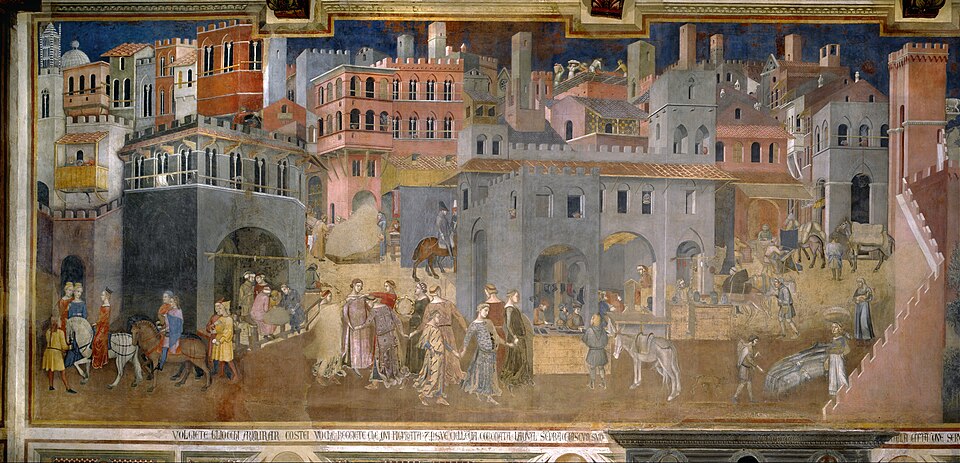
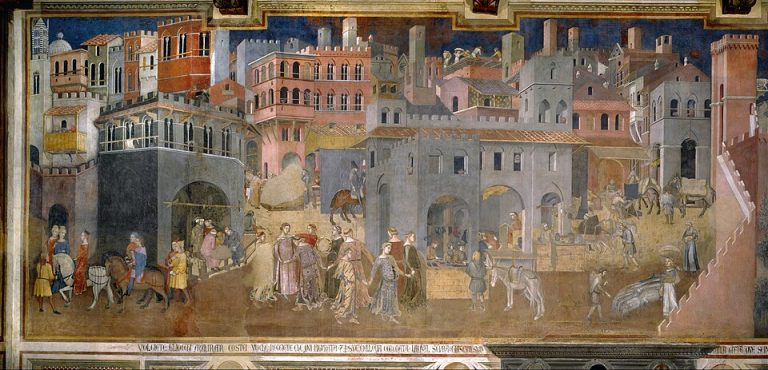
Ambrogio Lorenzetti – Effects of Good Government in the City, Public Palace – Siena
In history books, writers frequently portray the Middle Ages as a string of dates, battles, royal successions and other political developments. Although medieval chronicles preserve valuable accounts of events, they do not always reveal what everyday life was really like and how people lived. Digital storytelling helps fill this gap. Combining modern photographs of surviving buildings with historical illustrations, artefacts and documents can help create compelling stories that are easier to remember.
Digital storytelling doesn’t have to involve complex, high-budget 3D modelling. Often, a good photograph with text is sufficient. A photo slideshow maker for PC is a good example of such simple tools for combining old photographs, text, and narration. Such tools enable researchers, history enthusiasts and even teachers to make the presentation of the past engaging.
Notable Formats and Techniques of Digital Storytelling
There are a number of digital storytelling formats that can be effective in exploring the medieval period, from photo slideshows to more complex virtual tours of historic buildings. Below are some of the most useful digital formats and their applications to medieval studies.
Maps, Campaigns and Historical Routes
Maps can greatly strengthen historical narratives. They help audiences understand where events occurred, how places connected, and how geography shaped events. This aspect is even more important for the Middle Ages, as political boundaries often changed and seldom matched those of modern nation-states.
A brief visual story could show the likely route a medieval army took across part of Europe, trace one of several routes a pilgrim could have taken to Santiago de Compostela, or portray major medieval trading routes. Animated lines and text would indicate the main stops, with dates to clarify the sequence of events along the route.
Additionally, maps can be used to highlight events that may not be immediately clear. For example, maps and illustrations can be used to show how trade routes between distant towns contributed to the growth of markets, ports and specialised crafts in particular regions.
Daily Life and Material Culture
Architecture, clothing, food, tools, utensils and other household items can also be included to depict and explain the details of everyday life.
Depending on the location and historical period, an illustration of a medieval town could show:
-
Street layouts and different styles of timber or stone housing.
-
Clothing and accessories that reflected occupation, wealth and social status.
-
Workshops containing tools used by blacksmiths, weavers, potters and other craftspeople.
-
Household objects, cooking equipment and furniture.
-
Churches, marketplaces, castles, and defensive structures, where relevant, are also included.
By focusing on specific items, such as cooking pots or craftspeople’s tools, a visual story can reveal aspects of daily life that broad images of castles alone might miss. In addition, these objects can provide a starting point for explaining the materials, methods and skills of the period.
Personal Stories and Micronarratives
Using short, focused narratives can help people understand broader historical developments. These stories focus on a single person or group of people, rather than large events. Rather than explaining a whole war or conflict, a story might examine one journey, household or local event.
For example, a clearly identified fictional story, grounded in historical evidence, may follow a pilgrim’s journey. Each part may explore a different stage: preparations, difficulties along the way, encounters with other travellers and arrival at the destination.
Alternatively, a story could explore the life of a trader in a busy town, describing its market, the goods available, the dangers of travel and the role of merchant or craft guilds where these are documented.
Animating Still Images
Many visual stories can be created without filming new footage. Instead, images such as paintings, engravings, historical photographs of surviving sites and modern reconstructions can be combined. Later artistic depictions and reconstructions should be clearly identified as interpretations rather than direct records of medieval life.
Simple edits to static images can make them dynamic:
-
Zoom/pan animations: Slow zooms and pans across images can draw attention to a specific element, such as an entrance to a castle or an inscription.
-
Transition effects: Fades or dissolves can be used to move between different locations, times or parts of a story.
-
Titles: Short titles can be added to quickly provide key information about dates, people and places.
-
Audio: Adding music, background sounds and commentary can help create an atmosphere and highlight key details.
Consistency is important. All visual elements should work together to convey the same message.
Creating a Historical Visual Story
To create an effective visual history, think carefully about what you would like to include. Following a clear structure will also make researching and editing easier.
1. Choose a Topic and Narrative: You should choose a topic that can be broken down into several short sections. Choosing a broad topic, such as ‘life in the Middle Ages’, can make it difficult to summarise in a short video. A narrower subject will often provide a clearer narrative.
Possible ideas include:
-
A pilgrim’s journey along a medieval route.
-
A reconstructed day in a particular medieval market town.
-
The construction and development of a castle.
-
The history of a particular trade or craft.
-
Changes in a town caused by a period of conflict.
Once you have decided on a topic, split it into short sections. These sections should answer one question or include one key piece of information. For example, if investigating a castle, sections may include location, construction, defences, daily life and later history.
2. Gather Historical Resources: The next step is to locate visual sources. Depending on the topic, visual sources can include photographs of surviving buildings and archaeological finds, medieval manuscripts, paintings and maps.
Two projects can draw on the same source material yet tell very different stories. Re-examining familiar images may also reveal details or perspectives overlooked in earlier interpretations.
Not every image that you encounter directly illustrates medieval life. Photographs of reconstructed buildings or historical re-enactments show modern interpretations, which may differ from what archaeological and written evidence suggest.
Some things to look for when reviewing an image are the following:
-
Who created the image?
-
Does it show an original object, an illustration or a reconstruction?
-
Does the image reflect the correct historical period?
-
Are there any copyright or licensing restrictions on its use or reproduction?
3. Combine Images and Text to Create a Video: After gathering the necessary images and text, you can use editing software to combine them into a presentation. One desktop option is SmartSHOW 3D. This software allows users to create a slideshow using photographs, illustrations, text, music and voiceovers. Users can also add animated transitions.
This format can suit different purposes. A teacher might prepare a short presentation about medieval trade, while a history enthusiast could create a visual account of a castle’s development. The same approach also works for supporting material on a history website or an online lesson.
The process doesn’t need to be overwhelming. Just arrange your pictures according to the narrative, write short notes, and use transitions to connect one section to the next. Adding a voiceover can help provide more context.
4. Pay Attention to Composition and Pace: There needs to be sufficient time for the audience to reflect on the material. Images that change too rapidly may cause the audience to miss important details. Long captions may have the same effect, especially when they contain a lot of information.
Excessive visual effects can also create a sense of confusion. Avoid excessive effects and decoration. Transitions should help connect the material rather than distract from the historical subject.
The same principle applies to sound. Music should support rather than dominate the narration. Unrelated sound effects should be removed.
Conclusion
Digital storytelling can make medieval history more engaging for a modern audience. Maps, historical illustrations and personal stories all help to make the events of the period more accessible and provide a window into the lives of people at that time. A well-researched story with suitable images and thoughtful editing can create an effective video for a lesson, a website or a personal project.
Visuals should support historical facts, not replace them. Careful research and respect for original sources remain essential. When these elements come together, the Middle Ages become more than a collection of dates and events: they become a world that audiences can better understand.
Copyright, Licensing and Disclosure
© HistoryMedieval. All rights reserved.
This article may not be copied, republished, adapted, translated, distributed, scraped or otherwise reused without prior written permission, except where permitted by law. Unauthorised use for AI training, dataset creation, text and data mining or generative-AI systems is prohibited.
Third-party images and materials may be subject to separate copyright or licensing terms. For copyright concerns, contact info@historymedieval.com. We will review the matter and take any necessary corrective action.
This article may contain affiliate links. We may earn a commission from qualifying purchases at no additional cost to the buyer.